
How Bingy works
Bingy is a Chrome extension that turns Netflix into a language learning tool. Instead of switching between subtitle languages, Bingy adapts subtitles to your exact vocabulary level.
Take a 45-second vocab test
Before watching anything, Bingy needs to understand your current level. A quick vocabulary test shows you words at 12 different frequency levels (from the 100 most common to the 5000 most common). You simply mark which words you recognize. The whole thing takes about 45 seconds, and you can do it on your phone, computer, or tablet.
Watch Netflix with smart subtitles
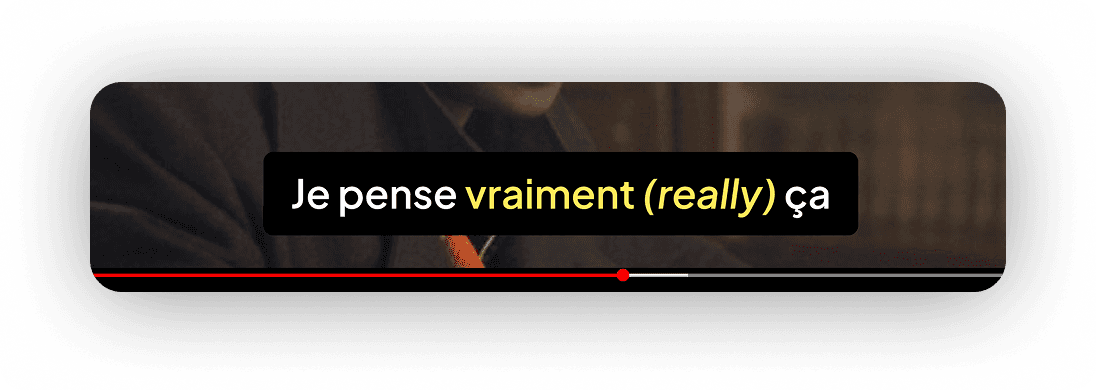
Open any show on Netflix and activate Bingy. Subtitles stay in your target language (French, Portuguese...) so you get maximum exposure. But when a word you don't know appears, Bingy translates it inline in your native language — right there in the subtitle. No pausing, no dictionary lookups, no context switching. You learn naturally, the way you learned your first language: through context.
Mark words as known and watch Bingy evolve
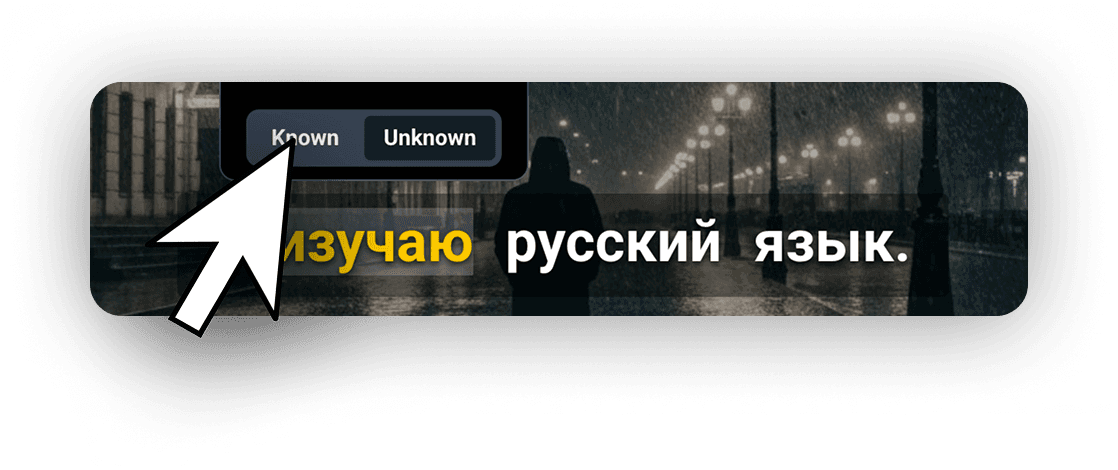
As you watch more episodes, you'll start recognizing words that were once unknown. Mark them as known directly on the Netflix interface, and Bingy stops translating them. Over time, fewer and fewer words get translated — which means you're actually learning. Most users learn hundreds of new words per week without even trying.
Why learning with Netflix actually works
Comprehensible input
Language acquisition research shows that we learn best when we understand most of what we hear, with just a few new elements. Bingy creates exactly this: subtitles you mostly understand, with translations for the words you don't.
Context-rich learning
Every translated word appears in a real sentence, in a real scene, with real emotions. This contextual learning is far more effective than flashcards or vocabulary lists because your brain creates stronger memory associations.
Consistency without effort
The hardest part of language learning is staying consistent. With Bingy, your daily Netflix habit becomes your daily language practice. No extra time needed — just watch what you already enjoy.
Ready to start learning?
Take the free vocab test and set up Bingy in under 2 minutes. Your next Netflix session could be your first language lesson.
Set up Bingy — it's free to try